Automatic Work Assignment
 1 / 7
1 / 7Why hello there! Are you someone just like me who hates doing manual work, but love spending significantly longer automating the same work? Then this might just be the mod for you! This mod adds a new Work Manager tab, that allows you to specify a number of work specifications to
Why hello there!
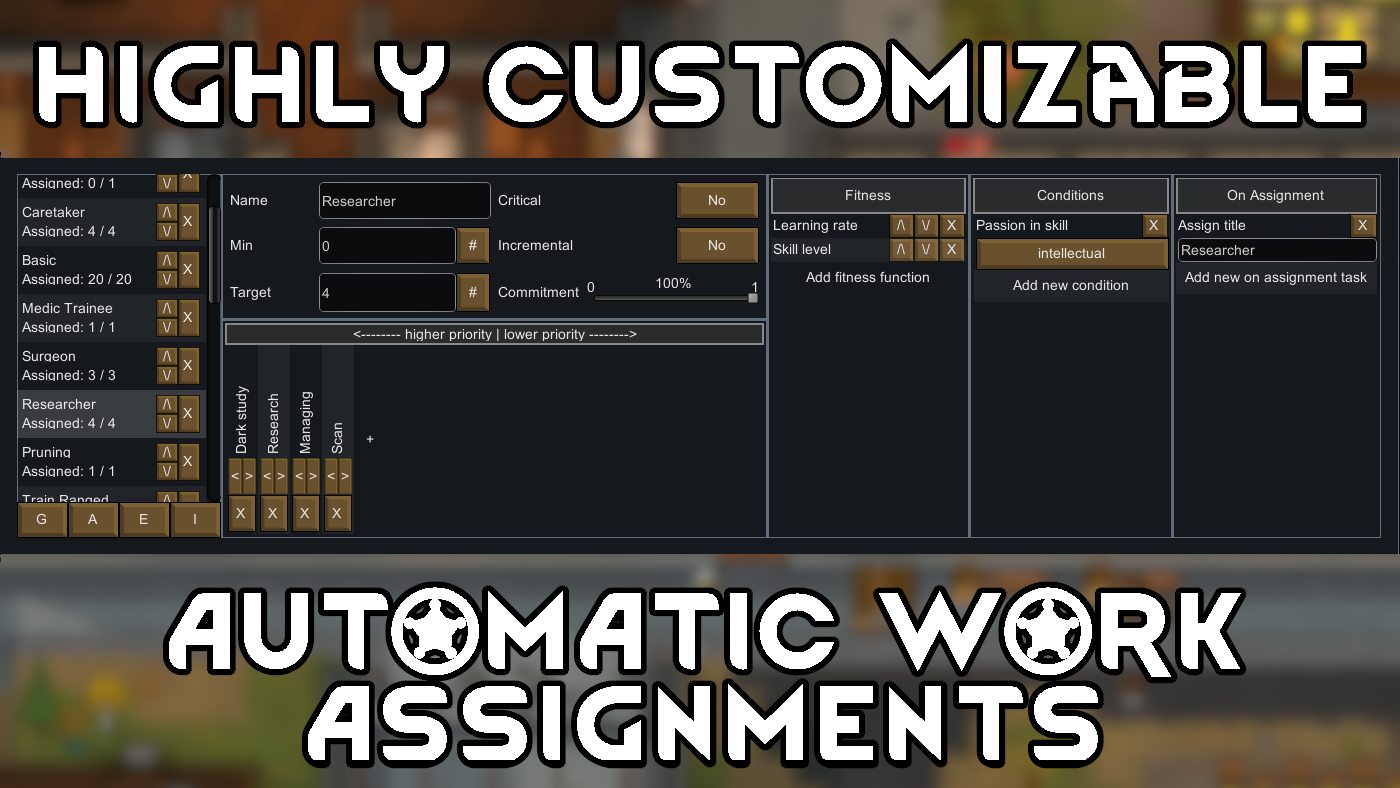
Are you someone just like me who hates doing manual work, but love spending significantly longer automating the same work? Then this might just be the mod for you! This mod adds a new Work Manager tab, that allows you to specify a number of work specifications to be automatically assigned to your colonists. Each work specification has its own fully customizable fitness functions used to prioritize who is assigned to it, as well as the conditions that must be met for assignment. You can even choose to have certain actions performed when the work is assigned to a pawn! The ultimate goal of this, is to be able to fully automate the work assignments of all your pawns, with no need to exclude any. Though, you can still do so if you really need to. You can choose to only automate a subset of jobs, or automate them all, this mod is designed for maximum customizability. A few examples of what you can do:- Automatically assign all pawns with high enough skill level to medical work.
- Automatically assign pawns without the pyrophobia gene to firefighting.
- With training mods, assign pawns with passions, but low skill levels, to training work.
Quick info
There shouldn't be any mod incompatibilities. You can safely add this to a save. You should be able to safely remove this from a save. Let me know in the comments if you have any issues. Source: https://github.com/Lomztein/RW-AutomaticWorkAssignmentIntroduction
You'll find this tab right next to where you usually find your work tab. When you open it, you'll see a window composed of four major sections:Work Specification List
Here you see a list of work specifications. The order of these determines which will be assigned to colonists first. You can, of course, reorder them as you please. Reordering this list is currently a bit of a pain with large lists. I plan to look into the ability to drag the specifications, though for the moment you can hold shift while clicking the reordering buttons, and this will (sometimes, it's temperamental) move specifications all the way to the top or bottom. At the bottom of this list there are four buttons you use to do the following:- Resolve pawn assignments now.
- Automatically resolve assignments each day.
- Exclude certain pawns from assignments.
- Save / load configurations or import from other saves.
Basics
The top half of the middle section is where you can change the basic information of the work specification. The options are as follows.- Name: Just a label, doesn't have any impact other than organization.
- Min (workers): The minimum number workers. If not enough workers that meet the condition are available to meet this threshold, then conditions will be ignored until enough workers has been assigned.
- Target (workers): The target number of workers, or how many pawns should be assigned to this work.
- Critical: Pawns with critical work that are downed, will immediately be substituted by someone else if the number of workers fall below the minimum.
- Specialist: Designates that the work specification excludes pawns from assignments further down the list.
- Commitment: Estimate of how much of time is commited to this work, used to avoid over-comitting highly talented pawns.
Priorities
The bottom half of the middle section is the priorities. Add the jobs you wish done for this work to this list, ordered by priority. The assignment algorithm will assign priorities to pawns in the order you define here.Settings
This is where you define how your pawns should be prioritized, what conditions must be met for a pawn to be assigned, and what tasks should run on assignment. This section is composed of three subsections.Fitness
Here you define the fitness functions to be used to prioritize which pawns will be assigned to work. This cascades, so that functions further down the list act as 'tie breakers' for functions further up the list. For example, if you have the 'Learning rate' function at the top, and 'Skill level' below that, it will prioritize all pawns with the highest learning rate first, and of those it will prioritize those with highest skill level.Conditions
This defines a set of conditions that must be met for a pawn to be assigned to the work, such as minimum or maximum skill levels, certain genes, passions. If you have any mod that allows your colonists to train, this can be used to automatically assign pawns with passions, and below a set skill level, to train that skill. Conditions are ignored if an insufficient amount of workers that meet them are ignored for the minimal amount of workers.On Assignment
This allows you to execute certain actions when a pawn is assigned the work, such as restricting apparel, drugs, or areas.Alternative mods
If this is all way more complicated than what you need, I can easily recommend any of these mods as alternatives. Automated Work Assignment: https://steamcommunity.com/sharedfiles/filedetails/?id=3453406362 AutoPriorities https://steamcommunity.com/sharedfiles/filedetails/?id=1598406574 I have used both of these with decent success on large colonies, and they are both excellent solutions if you're looking for something more "fire and forget".TODO
The current library of fitness functions, conditions, and on-assignment tasks are just what I've been able to come up with during development. More can added at request, or if you're feeling up for it, by other mods. The system is designed to be easily extensible. To implement a new fitness function, you just create a new class that implements the IPawnFitness interface, create a PawnSettingDef, and provide a PawnSettingUIHandler object. Check out the source code if you're feeling brave. (Fair warning, it was written largely over a weekend binge, enter at your own risk.) I plan to extend the library over time, including integrating features from other mods. There is still a lot of room for improvements, in particular regarding quality-of-life features for the UI.Similar Mods

Vanilla Cooking Expanded
Mechanics are simple and intuitive - keeping within the vanilla spirit without unnecessary fluff and production chains.


Humanoid Alien Races
A framework for the creation of new alien races in Rimworld If you ever thought that the racial diversity in rimworld is.

Vanilla Furniture Expanded - Security
Check change notes. Vanilla Furniture Expanded - Security is a complete overhaul and rebalance of the original security module, addressing outdated balance and vastly expanding defensive options from early to late game. For the new players, this mod should be the ultimate thing y
More Mods by Lomzie

Smelt Bioferrite
Tiny little mod made in about an hour because I couldn't find something similar on the workshop.
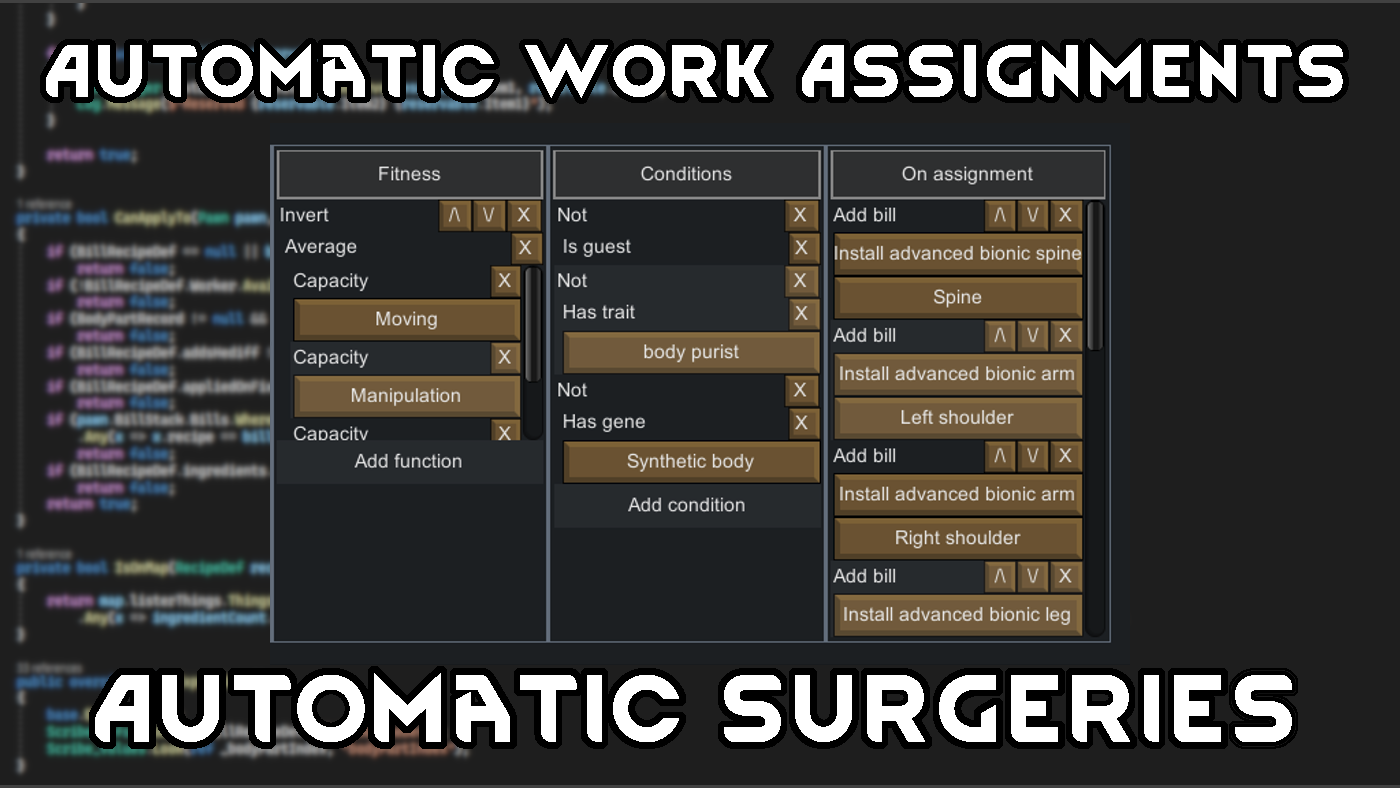
AWA Addon: Automatic Surgeries
This is a small addon mod to my Automatic Work Assignments mod, that adds features for automatically performing surgeries on pawns.

Psychic Sensitivity Affects Bandwidth
The psychic sensitivity of a mechinator should result in an increase in mech bandwidth, no?
More Management Mods



Vanilla Apparel Expanded
1.2.1 (25/02/2020): Formal wear now counts as royal apparel. 1.2.0 (19/02/2020): This mod is now 1.1 compatible. After a hundred hours playing RimWorld you notice that every pawn wears somewhat the same things. The base game apparel is not really as interesting, unique and variou