Configurable Needs Freeze — Disable Needs: Caravans, Raids & Maps
 1 / 9
1 / 9THIS MOD WAS CREATED USING ARTIFICIAL INTELLIGENCE.
THIS MOD WAS CREATED USING ARTIFICIAL INTELLIGENCE.
THIS WAS CREATED FOR PERSONAL USE, SO IT COMES WITH NO GUARANTEES.

✨ Features - ALL CONFIGURABLE
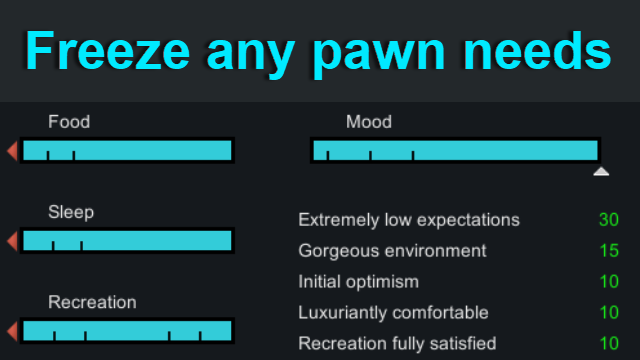
Features Description❄️ Individually freezing any need/needs
- At a 100% need level OR
- At their current need level
- Optional "Allow recovery" setting (needs can only increase but not decrease)
🚫 Hiding frozen needs from UI
- If the function is enabled - needs will only be hidden, but not deleted, as this is done in other mods.
- This should allow to avoid most red errors.
⚔️ Auto-freeze only during active threats
- When this function is enabled, the mod will automatically activate only during threats (e.g., raids) and deactivate when there are no more threats.
⛺ Caravan Needs Freezing
- Independent caravan settings
- While this function is disabled, caravan needs will be frozen according to the main mod settings.
- Once enabled, you can configure needs for caravans, and they will take priority over the main mod settings.
- If enabled, settings such as "Allow recovery," "Freeze at 100%," as well as "General" and "Hediff mode" settings will be taken from the main mod settings.
- If disabled, the same settings within the caravan settings will take priority over the main mod settings.
➕ Custom hediffs
Can be assigned to any pawn individually to freeze their needs according to the mod settings.- GeneralFreezeNeeds — Freezes needs on both maps and caravans.
- FreezeMapNeeds — Freezes needs exclusively on maps.
- FreezeCaravanNeeds — Freezes needs exclusively in caravans.
🗺️ Map Filter
- The mod will work only on maps that you select in the settings (by default — ALL MAPS).
- "Clear Orphaned Map Data" button — removes saved non-existent maps from the save file.
💾 Presets
🚀 Performance
Depends on enabled mod settings, the number of pawns on the map, and game speed — but on average, it does not exceed 0.1 ms at game speed ×3 with 100 pawns.🐛 Bugs
Since the mod was made by artificial intelligence, despite the fact that I try to carefully double-check everything it does, and I also try to test all new features, I may miss something.🧩 Support for Modded Needs
I may occasionally add needs from other mods if someone needs them, but if you do not want to wait, you can add them yourself by following the instructions below.📖 Guide for adding new needs from third-party mods yourself
1. Open the folder of the mod from which you want to add a need. 2. Find the Defs folder, and inside it the xml file with the desired need (It is usually named something like NeedDef.xml), open the xml and copy the defName of that need, for example Hygiene (Dubs Bad Hygiene).
Hygiene
3. Go to the folder of my mod and find the following xml "\Defs\FreezeNeedDefs\FreezeNeedDefs.xml"
You can copy any need from the file and paste it at the end of the file, then replace the contents of the need. Here are explanations for each field:
XML Tag
Explanation
Dubwise.DubsBadHygiene
This tag affects which needs will be hidden if the mod or DLC specified here is not installed.
PackageId can be found in mod folder: \About\About.xml.
4. Go to the folder of my mod and find the following XML — "\Defs\FreezePawnCategoryDefs\FreezePawnCategoryDefs.xml".
In it, you do not need to create or delete anything, just enter the defName of your need here for those pawn categories where you want this need to be visible in the mod settings.
This XML defines which needs will be shown in the settings for which pawn categories.
Hygiene
🤝 Inspired by
Disable Needs 禁用需求 Inspired by the idea of allowing individual control over the needs of each pawn category. Disable Raid Needs Inspired by the idea of freezing needs during active threats, as well as the function that allows needs to only increase but not decrease. + Fixed an issue with non-aggressive Insectoids that I encountered while using this mod.Similar Mods
Vanilla Hair Expanded
1.2.0 (17/05/2020): Fixed label length issue. 1.1.1 (29/02/2020): Beards now work perfectly fine! Thanks for your patience. We have all been there, with a colony of a hundred pawns where everyone looks somewhat the same. Starting colonists with no character to their looks. This m

QualityBuilder
With QualityBuilder all buildings that have quality (beds, tables etc) will only be build by the best builder to ensure the best outgoing quality.

More Management Mods
EdB Prepare Carefully
Customize your RimWorld colonists, choose your gear and prepare carefully for your crash landing!
Vanilla Apparel Expanded
1.2.1 (25/02/2020): Formal wear now counts as royal apparel. 1.2.0 (19/02/2020): This mod is now 1.1 compatible. After a hundred hours playing RimWorld you notice that every pawn wears somewhat the same things. The base game apparel is not really as interesting, unique and variou