Dawn of a New Day
 1 / 10
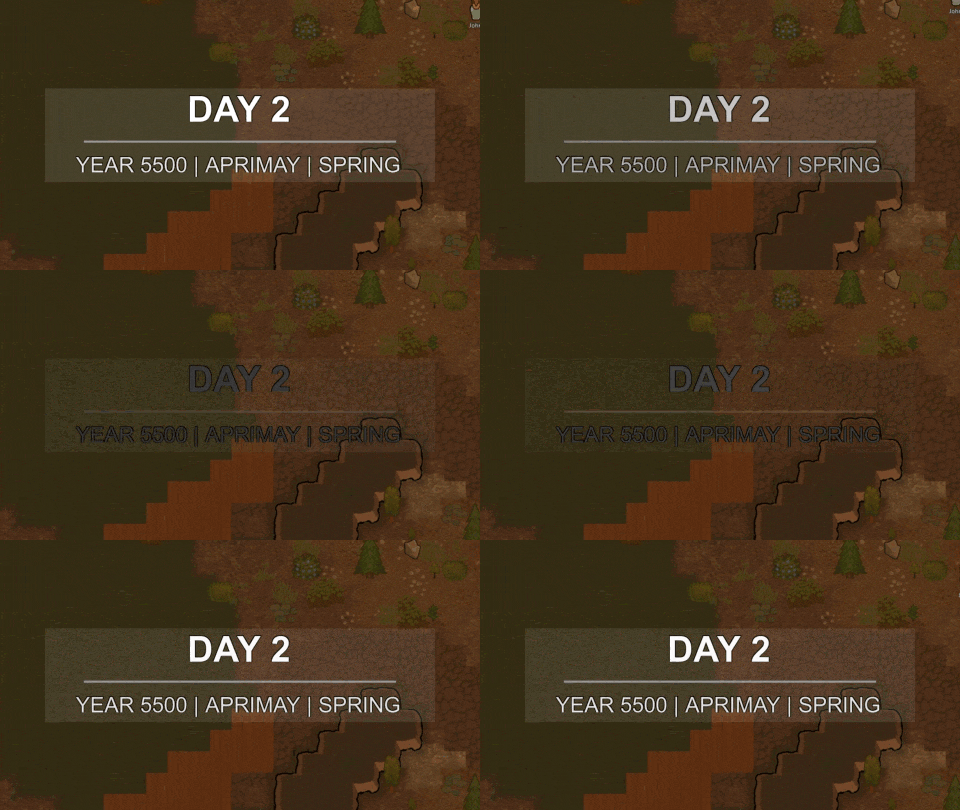
Mod Version: v1.3.3 Showcase video is outdated :\ Adds a customizable header overlay that displays at the start of the day. PATCH NOTES Mod Update v1.1.0 Re-haul of the Mod options. Added Text font family customization. Added Hour Trigger. Fixed mod conflict with Readable Numbers
Mod Version: v1.3.3
Spoiler
Adds a customizable header overlay that displays at the start of the day.
PATCH NOTES
Mod Update v1.1.0
- Re-haul of the Mod options.
- Added Text font family customization.
- Added Hour Trigger.
- Fixed mod conflict with Readable Numbers.
Mod Update v1.1.1
- Added Translation compatibility.
- Fixed Label Format defaults.
- Fixed Quadrum and Season Label auto-translation.
Mod Update v1.2.0
- Added Sound (Majora's Mask sound effect as default obviously).
- Turned some text fields into sliders for users comfort.
- Added Italian Translation.
- Removed duplicate fonts in the dialog (variants for Bold and Italic, because it's already in the mod options and I don't like the redundancy).
Mod Update v1.2.2
- Added Harmony 2.4.2 dependency (for future compatibilities).
- Fixed default Font Family bug.
Mod Update v1.3.0
- Updated Translations IDs (any outdated translation needs a fix!).
- Fixed Full Hour format (by Spagles).
- Various error prevention fixes (by Spagles).
- Added integrated Chinese Simplified translation (by ylc395)
Mod Update v1.3.1
- Fixed compatibility for RimWorld 1.5 .
Mod Update v1.3.2
- Fixed performance issues during overlay (From ~3ms/frame to ~0.4ms/frame).
Mod Update v1.3.3
- Fixed compatibility for Readable Numbers.
FEATURES
Go to: Options > Mod options > "Dawn of a New Day";
Header/General
- Enabled: You can toggle the overlay anytime without restarting.
- Screenshot Mode: When in Screenshot Mode (F11), if enabled the overlay won't be displayed.
- Show Example: Shows your current overlay configuration in the next tick to ease and familarize with the settings.
Appearance
- Show Highlight: Adds a low-opacity light background behind the overlay.
- Scale: Scales the whole overlay to your like.
- Offset Presets: Helps you to choose an offset of your liking without trial and error.
- Offset sliders (px): Choose offsets on X and Y axis at pixel-precision.
- Line Width (%): Choose the width in percentage of the line that divides the Upper from Bottom.
- Line Thickness (px): Choose the thickness in pixels of the line that divides the Upper from Bottom.
- Line Padding (px): Choose the padding in pixels that divides the line from the Upper and Bottom.
Duration
- Total Display Duration: Choose the total duration of the overlay in seconds.
- Fade In Duration: Choose the duration of the overlay fading-in in seconds.
- Fade Out Duration: Choose the duration of the overlay fading-out in seconds.
Text
- Choose Font Family: Choose an custom OS font to replace the default game font of the text.
- Font Size: Choose the character size of the text.
- Outline Thickness: Choose the thickness of the outline of the text.
- Bold: Enable to add bold style to the text.
- Italic: Enable to add italic style to the text.
- Text Color: Choose from the color presets the color of the text.
- Outline Color: Choose from the color presets the color of the outline of the text.
Label Format
- Upper Text Format: Choose the format of the Upper text.
- Bottom Text Format: Choose the format of the Bottom text.
Format
Description
{D/d}
Full Day
{Y/y}
Full Year / 2-Digit Year
{Q/q}
CAPS Quadrum / Quadrum
{S/s}
CAPS Season / Season
{H/h}
Full Hour / Hour
Sound
- Enabled: Toggle the sound that starts with the overlay.
- Choose Sound: Choose a custom sound from the catalogue.
- Sound Volume: Choose the volume of the sound.
- Pitch Volume: Choose the pitch of the sound.
Extra
- Starts at Zero: Enable to start the count of the days from 0 instead of 1.
- Show Every X Days: Choose how often the overlay displays .
- Trigger Hour: Choose at what hour of the day the overlay displays.
- Day Relative: Choose what the value of day will be relative to.
Name
Description
Settle
Day will be relative to the day the colonists settled.
Quadrum
Day will be relative to the quadrum resetting itself after 15 days.
Season
Day will be relative to the season resetting itself after it ends.
Year
Day will be relative to the year resetting itself after 60 days.
COMPATIBILITY
- Saves: Can be safely added to or removed from existing save games at any time since it doesn't affect the game in any way.
- Mods Conflicts: No known conflicts.
- Mods: No compatibility yet added.
INTEGRATED TRANSLATION
- English: Made by myself.
- Italian: Made by myself.
- Chinese Simplified: Made by ylc395.
If you want to integrate a translation for the mod, follow these steps:
- Go into the GitHub Repository (DawnOfANewDay)
- Clone the repository in your device.
- Look for "Languages" folder.
- Copy the path from "English" and rename it into your language.
- Go into "
\Keyed\Misc.xml" and translate the file in your own language. - Finally, commit your changes and create a Pull Request into the main branch of the repository.
TODO LIST
- Add compatibility with Modern Notifications.
- Add compatibility with Explicit Timing.
- Add additional special custom text subtitle.
- Add renaming day section in mod options.


Similar Mods


Vanilla Apparel Expanded
1.2.1 (25/02/2020): Formal wear now counts as royal apparel. 1.2.0 (19/02/2020): This mod is now 1.1 compatible. After a hundred hours playing RimWorld you notice that every pawn wears somewhat the same things. The base game apparel is not really as interesting, unique and variou
More Mods by AlenDio
Bulk Shells
Features Make 10x/20x of High-Explosive Shell Incendiary Shell EMP Shell Smoke Shell Firefoam Shell Toxic Shell Also check Make Your Bulk
Make Your Bulk
Mod Version: 5.0 QoL Mod Tired of crafting items one by one? This mod allows you to automatically make new Bulk recipes based on existing ones. How to use Go to "Settings -> Mod Options -> Make Your Bulk". Add Recipe: Select an existing recipe to create its bulk version. (RECOMME

More Management Mods

Vanilla Expanded Framework
The Vanilla Expanded Framework (VEF) is a core modding library required by many of the Vanilla Expanded mods.

RimHUD
RimHUD is a UI mod that displays detailed information about a selected character or creature.