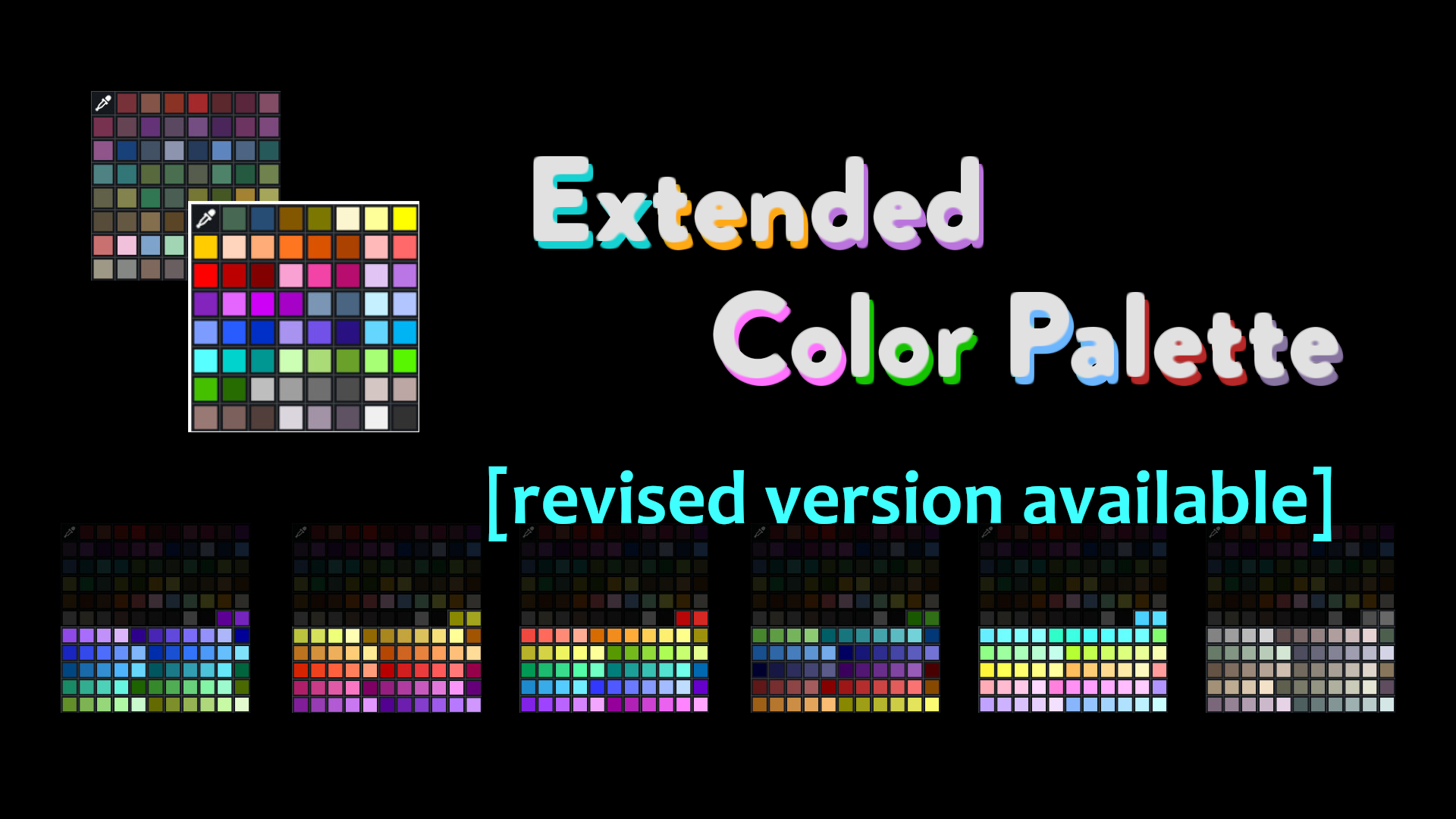
Extended Color Palette [revised version available]
 1 / 9
1 / 9If you're new here, please move on to the revised version of this mod.
If you're new here, please move on to the revised version of this mod.
If you're already using this mod, do not switch on an existing save if you're using one of the bright palettes, because paint and carpets may vanish. Also, note that you will have to redo the mod settings for the revised version of the mod, including custom colors if you've set any. But if you can, I suggest you switch to the revised version for compatibility reasons.
- - - This mod gives you the option to make changes to the color palette which is used for vanilla carpets and for painting floors and buildings. Nothing will happen when you first load it, you have to go to the mod settings and choose what you want to do. You can: 1) Exchange the regular color palette with a brighter one, or a less bright one (with all the same colors just a little darker). Note the warning below. and/or 2) Add the colors of the bright palette to Ideology colors. and/or 3) Extend the main color palette with a set of style colours. and/or 4) Add up to 15 custom colors to the palette. On style colors: You currently have- If you don't have Ideology installed, you can just ignore the setting for Ideology colors.
- The colors white and black are reordered to be the last in the main palette, so you can easily identify where the style colors start. (Though the carpet palette sorts differently for some reason.)
- The bright palette includes the three base game bed colors plus the additional bed color from Biotech, and adjusted black and white colors.
- Style Vanilla Plus is derived from bed colors, base game stones and wood.
- Style colors are named with words that are not really color-related. Why? I wanted to make it easier to recognize corresponding colors between styles. That's why the labels match. And the bright orange I called "sun" in the first palette might correspond to a pale blue in the second palette. Calling it "charm" or "delight" instead might be a bit weird, but it kind of works for both. I could have used numbers, I guess, but that would've just been unimaginative. (I admit, the color names of the bright palette are far less imaginative than that.)
- Unused custom colors will appear (and can be used as) black in the palette, called by their default name.
- Settings for this mod are created with XML Exensions, which has to be loaded for this mod to work.
Beware
If you switch the main palette to bright or less bright palette, or remove style colors completely, the colors not used are removed from the game. If you do this for an existing save, any paint on floors and buildings of one of those colors will be gone and corresponding carpets will vanish. Bright and less bright palette are interchangeable like style colors, though. Generally, add this to an existing save with caution! (Issues have been reported with: Colored Deep Resources)Incompatibilties/Issues
- Any mod that uses the base game structure colors in some way will probably be disrupted if the main palette is switched with the bright one by this mod.
- Using this mod together with More Colors may result in unintended behaviour.
- If used with More Planning 1.4, the colors for the planning menu will be lost (probably if you choose to change the main palette). Possible alternative: Planning Extended.
- No changes are made to the UI, so it is possible that added ideology colors are cut off in a menu, because the space isn't sufficient to display them all. This also affects other mods making use of colors, such as Gradient Hair.
Similar Mods

Vanilla Cooking Expanded
Mechanics are simple and intuitive - keeping within the vanilla spirit without unnecessary fluff and production chains.

EdB Prepare Carefully
Customize your RimWorld colonists, choose your gear and prepare carefully for your crash landing!
Vanilla Furniture Expanded - Farming
1.2.0 (21/02/2021): - Sprinkler effect no longer stack - Sprinkler no longer boost plant in hydroponic (they still boost planter box) - Sprinkler no longer boost trees 1.1.1 (08/04/2020): Fixed Animal feeder not appearing in the correct tab. Sprinkler no longer blocks wind. 1.1.0
More Management Mods


Vanilla Plants Expanded
Vanilla Plants Expanded is a core module in a plant-based in the new mod series “Vanilla Cuisine Expanded” from the Vanilla Expanded team.

Vanilla Expanded Framework
The Vanilla Expanded Framework (VEF) is a core modding library required by many of the Vanilla Expanded mods.

Character Editor
last update: v1.6.3 build on 2025-07-21 for RimWorld v1.6.4523 Editor for humanlike pawns on map and for crashlanding (colonists, enemies, dead pawns) MOD FEATURES • editor for pawns on map and for crashlanding • editable: body, head, hair, skin color, apparel color, gender, name