Graphical Scenario Editor - 图形化剧本编辑
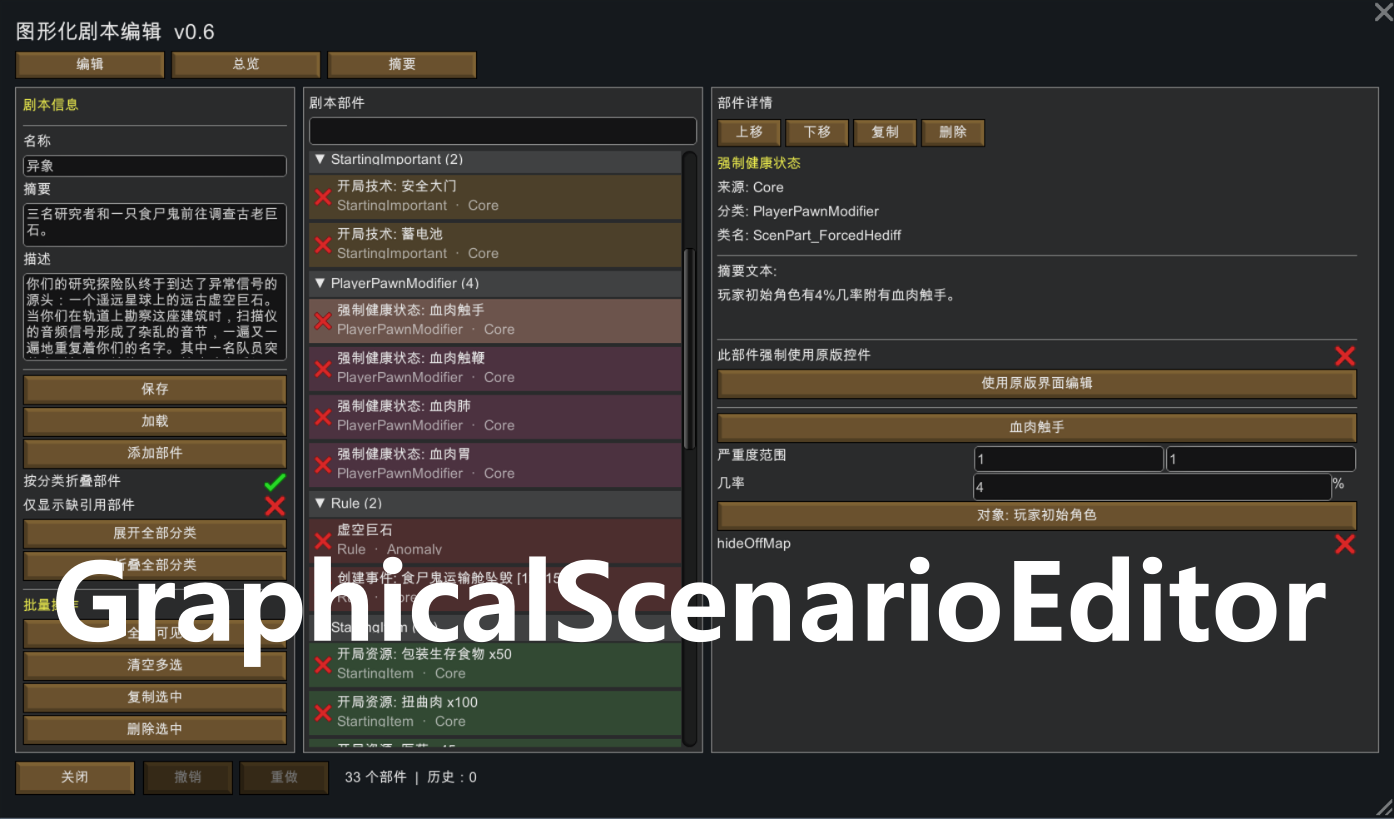 1 / 4
1 / 4Graphical Scenario Editor - 图形化剧本编辑 by flya.
Graphical Scenario Editor - 图形化剧本编辑
by flya. | Requires Harmony | RimWorld 1.6
在原版剧本编辑界面增加“图形化剧本编辑”入口,用更清晰的图形化窗口编辑自定义剧本。
主要功能:
• 剧本信息与部件统一浏览:名称、简介、描述、部件列表、分类折叠、搜索过滤
• 可搜索选择器:按名称 / defName / 模组来源筛选物品、事件、研究等,并提供预览信息
• 开局物资优化:物品图标、数量、品质、材料编辑;总览页支持合并同类物品、跨来源合并、估算总价值
• 创建事件增强:完整列出多个事件,支持触发时间区间、重复触发、事件分类过滤与批量改时间
• 长文本友好:开局对白支持滚动编辑、全屏编辑,以及 txt 导入导出
• 编辑效率:撤销/重做、多选复制删除、部件上移下移、总览点击跳转部件
• 兼容性:读取第三方模组新增的剧本部件字段;缺引用提示;可随时回退到原版编辑方式
不适合剧本开发者使用,仅作为玩家自组模组包时,一个便捷的开局选择
适合经常写自定义剧本、开局物资很多、事件配置复杂的玩家。
Adds a “Graphical Scenario Editor” button to the vanilla scenario editor, giving you a clearer graphical window for custom scenarios.
Main features:
• Unified scenario: part browsing: name, summary, description, part list, category fold groups, and search
• Searchable pickers: filter things, incidents, research, and more by label / defName / mod source, with preview info
• Better starting goods workflow: icons, counts, quality, and stuff editing; overview merge for duplicate items, cross-source merge, and estimated market value
• Create-incident tools: list multiple incidents properly, edit min/max day windows, repeat, category filters, and batch timing
• Long-text support: scrollable / fullscreen game-start dialog editing, plus txt import/export
• Faster editing: undo/redo, multi-select copy/delete, reorder parts, click overview rows to jump to parts
• Compatibility: reads fields from third-party scenario parts, highlights missing refs, and can fall back to vanilla editors anytime
Not suitable for script developers; intended solely as a convenient starting option for players creating their own mod packs.
Ideal for players who build custom scenarios with large starting inventories or complex incident setups.
Similar Mods

Vanilla Expanded Framework
The Vanilla Expanded Framework (VEF) is a core modding library required by many of the Vanilla Expanded mods.
More Mods by FLgaming



Directional Void Provocation - 定向虚空扰动
Directional Void Provocation (定向虚空扰动) 将虚空扰动定向到一个特定实体,而不是完全的偶然。 Focus void provocation on a chosen Anomaly entity instead of leaving it to pure chance.
More Management Mods

Wall Light
As of update 1.5, Rimworld now contains wall lamps that serve the same purpose that this mod served for many, many years. So, what does this do now? Adds wall sun lamps. Lets you configure the vanilla wall lamps (and the added wall sun lamps) like you could with the old wall ligh
Dubs Mint Menus
Adds new list boxes for recipe bills, health bills, plant selection, architect menu, research menu, and a quick select menu for designators, making it easier to find things when lots of mods are running.


Vanilla Cooking Expanded
Mechanics are simple and intuitive - keeping within the vanilla spirit without unnecessary fluff and production chains.