List Everything Improved
 1 / 2
1 / 2RimWorld-ListEverything: Improved.
RimWorld-ListEverything: Improved.
Search, order and potentially act on all things inside Rimworld Colony/Encampment maps. Version 3.0.Description:
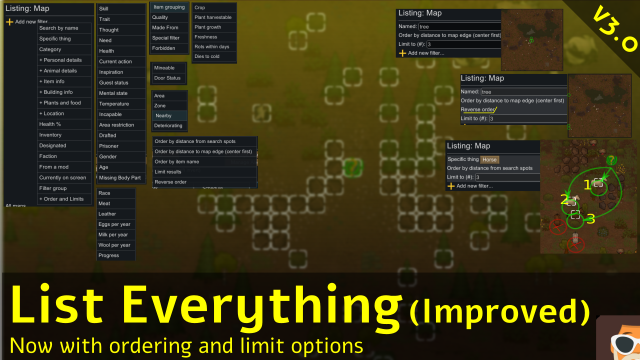
List all sort of "things" on the map with various filters. To start a search, click in the "Find" tab, or press Ctrl-F (by default), which will open a menu screen where you can compose your own query. The main difference from Uuuggggh's version is that I have added criteria for ordering and limiting query results. **3.0 Important change: the lists are no longer sorted in any way, unless you explicitly add a order clause: Look for "Order and limits" in this text. This means the original natural ordering by distance to Search Spot no longer work 'out of the box' since it is now a query option.** The following filters are available:- Search by name: show all items that has the provided text somewhere in its name.
- Specific Thing: search for a specific item type, like Wood, steel, compacted steel, etc.
- Category: search by a specific generic category : Person, Animal, Item, Natural, Plant, Other
- Personal details: some filters regarding colonist/animals info, such as thoughts, missing body parts, etc.
- Animal details: information regarding animals covering hunting and handling: milk fullness, egg hatching, meat amount, etc.
- Buildings : Hm... open close doors, mineable stuff?? Well, they are there...
- Plants and food: albucc's personal favorite. Find full grown plants that can be harvested. Find food about to spoil.
- location: filter things at areas / zones / and "things with other things nearby".
- Health: general health % of things, objects or not.
- Inventory: find things that are holding other things, or things this thing is holding.
- Designated: find things that are designated to be acted upon.
- faction: the faction the thing belongs to.
- from a mod: things belonging to a specific mod.
- currently on screen: things visible on screen.
- filter group: allows to perform union / intersection between multiple search criteria.
- Order an limits: *(new to 3.0)*: a series of criterias that tell to reorder the outcomes according to some criteria.
 can be placed
on the map. You can place as many of those as you want, at multiple maps. This filter will order the findings around that search spot.
* Order by distance to map edge(center first): itens more distant to the map edges come first.
* Order by item name: the items are sorted alphabetically by name.
* Limit results: allow to only pick a determined amount of results.
* Reverse order: invert the ordering of the findings.
can be placed
on the map. You can place as many of those as you want, at multiple maps. This filter will order the findings around that search spot.
* Order by distance to map edge(center first): itens more distant to the map edges come first.
* Order by item name: the items are sorted alphabetically by name.
* Limit results: allow to only pick a determined amount of results.
* Reverse order: invert the ordering of the findings.
Odd runtime behavior:
• As part of a future support for scripting, and for debug diagnostics, a special folder named this package id (uuugggg.albucc.ListEverything) will be created into your config folder. this will issue a small message in the logs showing that you can enable debug mode for this mod if you want, by creating a file, which will make very verbose file-base logging for this mod.Usage hints:
• The filters are always executed in the order they are listed. Make simple searches first, to narrow results, and only then use the more complex filters to gather information.Links and authoring:
This is a permanent fork of the mod https://github.com/alextd/RimWorld-ListEverything created by Uuuggggh. This mod on Steam: https://steamcommunity.com/sharedfiles/filedetails/?id=2896175723. Uuuggggh have abandoned this mod in favor of a full refactor into 4 new mods. You may check his actual work at https://steamcommunity.com/sharedfiles/filedetails/?id=2895300634Compilation hints:
1) Follow the typical configuration for mods, as discussed in the wiki https://rimworldwiki.com/wiki/ModdingTutorials/Settingup_a_solution The most important of all is the fact that *if you don't place the repository inside the rimworld Mods directory, references to required libraries will break*. The shellscript ./release.sh allows to build a "clean release" at another mod folder. It can be executed with Git Bash or a typical shellscript terminal. Personally, I use Ubuntu at my windows machine (WSL).Contributing:
• Please be free to check the code and contribute. Also be welcome to fork this code and create your own changes (just as I did).How to get help:
I don't see a problem if you post questions in the Comments section. If for some reason this is not possible for you, consider opening an issue on github https://github.com/abmpicoli/rimworldlisteverything_fork/issues.Similar Mods

Vanilla Hair Expanded
1.2.0 (17/05/2020): Fixed label length issue. 1.1.1 (29/02/2020): Beards now work perfectly fine! Thanks for your patience. We have all been there, with a colony of a hundred pawns where everyone looks somewhat the same. Starting colonists with no character to their looks. This m

Pick Up And Haul
"Greatest hauling mod ever" - Chicken Plucker Colonists will gather stuff in their inventory, then haul it all to a stockpile.


RimHUD
RimHUD is a UI mod that displays detailed information about a selected character or creature.
More Management Mods

Vanilla Cooking Expanded
Mechanics are simple and intuitive - keeping within the vanilla spirit without unnecessary fluff and production chains.

Smarter Construction
Stop your pawns from constantly building themselves into a wall or blocking something that hasn't been built yet.

Vanilla Apparel Expanded
1.2.1 (25/02/2020): Formal wear now counts as royal apparel. 1.2.0 (19/02/2020): This mod is now 1.1 compatible. After a hundred hours playing RimWorld you notice that every pawn wears somewhat the same things. The base game apparel is not really as interesting, unique and variou
