Work Memory

Work Memory Your crafter has a brain.
Work Memory
Your crafter has a brain. Sometimes it even remembers what it was doing. Work Memory gives recipes a sense of practice: repeat the same kind of work, and a pawn gets into rhythm; leave it too long, and that rhythm cools off. Keep at it long enough, though, and part of that skill sticks for good. The idea is simple, and annoyingly real. Reopening a project after a few days usually does not start with work. It starts with remembering where you stopped, why the last decision made sense, and why some past version of you named a variable like that. Once the brain catches up, efficiency starts climbing again. Yet there are also things you simply never forget. Write enough code, and certain patterns become muscle memory you could recite half asleep. That is how our brains actually work: short-term and long-term memory run side by side, and enough practice carves some skills in for good. Work Memory models both layers. RimWorld pawns deserve a taste of office life too.For Rimsonable Players
If you are coming here from Rimsonable's migration notice, welcome back! This is the former Rimsonable Work Memory feature, now moved into its own mod. The old version was a good idea with suspicious numbers. A 50% cold start penalty and short fade delay meant your best crafter could spend more time being punished for starting work than rewarded for staying focused. Realistic for software development, maybe less ideal for a colony simulator. Admittedly, the original values were tested only in the dev environment, not judged in real colony gameplay. Once I enabled it in my own colony and watched pawns constantly suffering from the 50% speed penalty, even I wanted to turn the feature off myself. The new version now makes the default values more Rimsonable:- Cold starts begin at 70% speed instead of 50%.
- The default maximum is 115%, because the bonus is always 50% of the penalty.
- Short-term memory waits one in-game day before it starts decaying.
- A long-term memory layer now lets persistent practice stick permanently, so seasoned crafters keep an edge across breaks.
- The settings menu lets you adjust both curves in full.
How It Works
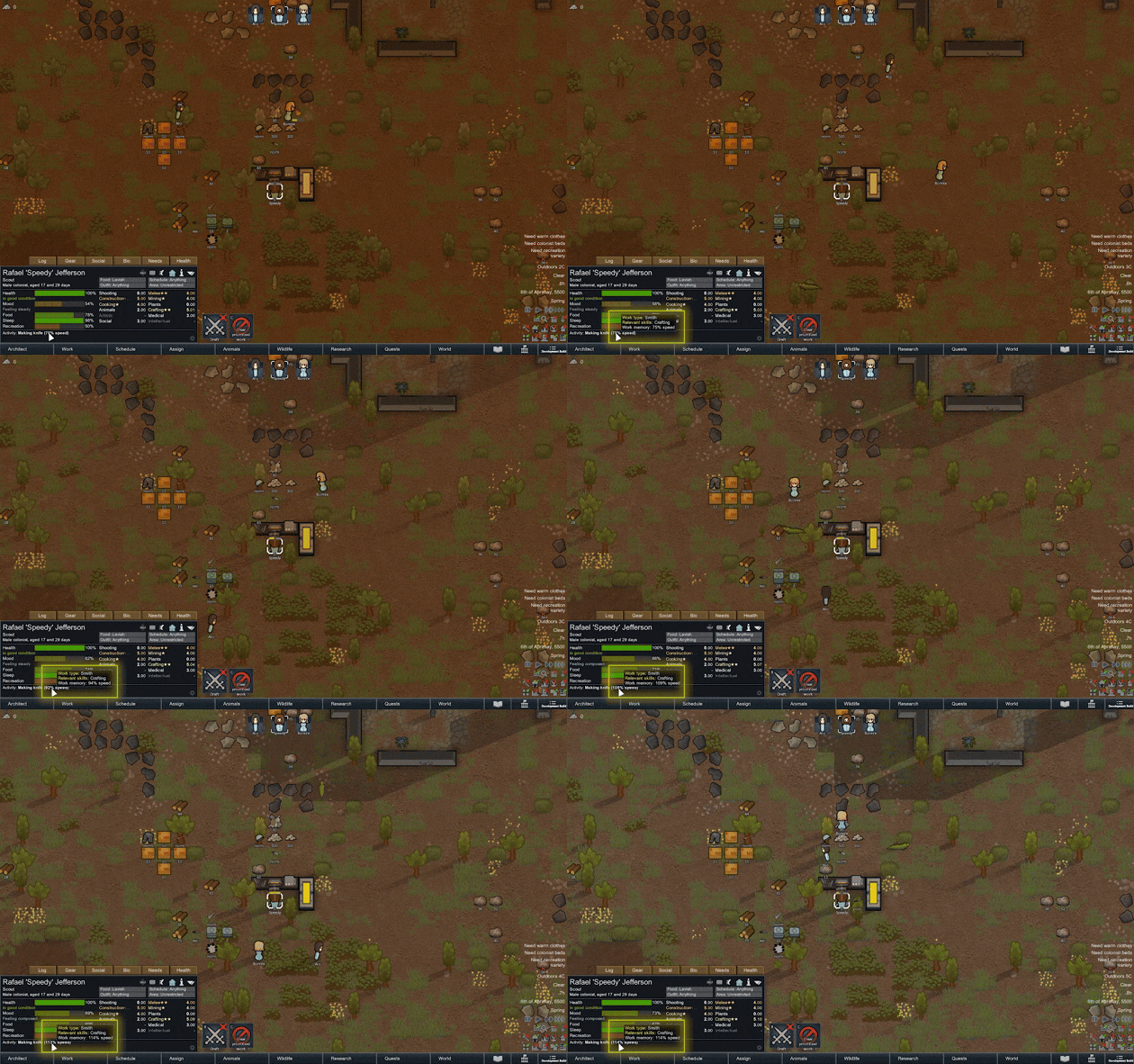 When a pawn works at a workbench on a tracked recipe, Work Memory records familiarity for that pawn and that type of work. More repetition means a better speed multiplier; too much time away means the pawn has to warm up again.
That familiarity lives on two layers. The short-term layer builds quickly and fades just as quickly once the pawn stops, modeling the warm-up rhythm of a focused work session. The long-term layer accumulates slowly across every repetition and sets a permanent floor the short-term decay can never drop below, modeling skills that genuinely consolidate over time.
In practice this means a pawn who has crafted hundreds of plate armors keeps a lasting edge even after a long break, while a pawn touching a recipe for the first time in a while still has to shake off the rust before reaching their personal ceiling.
By default, it only applies to recipes that produce items with quality, such as weapons and apparel. If you want cooking, refining, smelting, and other non-quality recipes to use the same mechanic, there is a dedicated setting for that.
The memory is mostly tied to the exact recipe, but some familiarity carries through related product categories and the same workbench. A pawn switching between similar armor bills is not a complete beginner. A pawn switching from helmets to fine meals is, academically speaking, pushing it.
The current multiplier appears in the pawn info panel while they work, so you can see exactly how Work Memory is affecting their speed.
When a pawn works at a workbench on a tracked recipe, Work Memory records familiarity for that pawn and that type of work. More repetition means a better speed multiplier; too much time away means the pawn has to warm up again.
That familiarity lives on two layers. The short-term layer builds quickly and fades just as quickly once the pawn stops, modeling the warm-up rhythm of a focused work session. The long-term layer accumulates slowly across every repetition and sets a permanent floor the short-term decay can never drop below, modeling skills that genuinely consolidate over time.
In practice this means a pawn who has crafted hundreds of plate armors keeps a lasting edge even after a long break, while a pawn touching a recipe for the first time in a while still has to shake off the rust before reaching their personal ceiling.
By default, it only applies to recipes that produce items with quality, such as weapons and apparel. If you want cooking, refining, smelting, and other non-quality recipes to use the same mechanic, there is a dedicated setting for that.
The memory is mostly tied to the exact recipe, but some familiarity carries through related product categories and the same workbench. A pawn switching between similar armor bills is not a complete beginner. A pawn switching from helmets to fine meals is, academically speaking, pushing it.
The current multiplier appears in the pawn info panel while they work, so you can see exactly how Work Memory is affecting their speed.
Settings
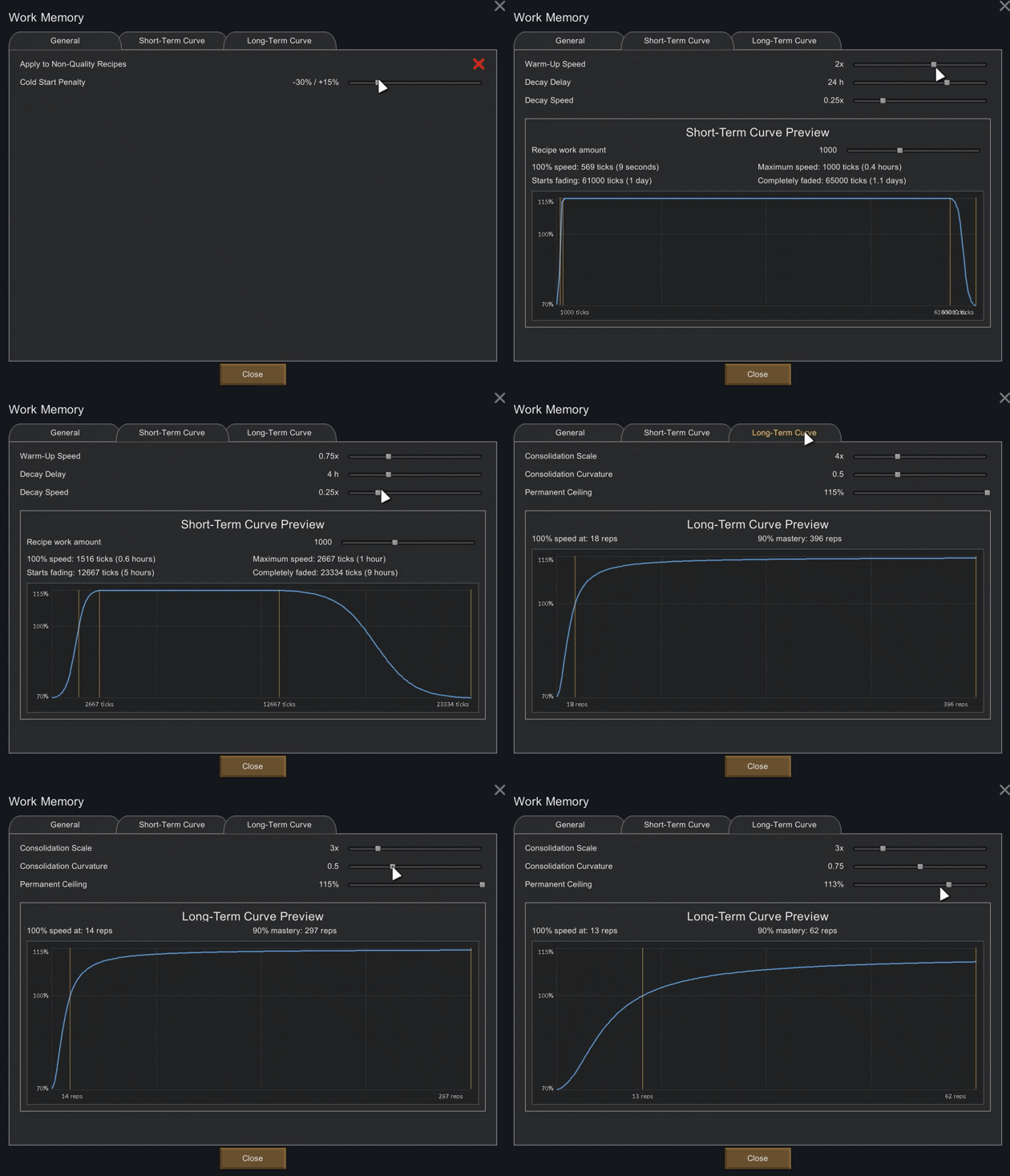 The settings menu is split into three tabs:
General
The settings menu is split into three tabs:
General
- Apply to non-quality recipes.
- Adjust the cold start penalty and maximum bonus.
- Change how quickly pawns warm up.
- Change when memory starts fading.
- Change how quickly it fades.
- Set how much repeated work it takes before memory becomes permanent.
- Shape the diminishing returns of consolidation.
- Cap the permanent ceiling, or disable the long-term layer entirely.
Compatibility
Required: Harmony Supported RimWorld version: 1.6 Optional integration:- RimHUD
Supported Languages
- English (manually curated)
- Simplified Chinese (manually curated)
- Traditional Chinese (manually curated)
- German (LLM translated)
- Korean (LLM translated)
- Russian (LLM translated)
Other Mods by Me
Rimsonable: A collection of toggleable tweaks to make RimWorld more reasonable. It's also where this feature used to live, before I decided it deserved its own spotlight. Useful Marks in Colony Groups: A compatibility patch for Useful Marks and Colony Groups, making the marks show up properly in the Colony Groups colonist bar. GitHub repository: https://github.com/truemogician/Make-RimWorld-Great-Again/tree/main/WorkMemorySimilar Mods
Vanilla Furniture Expanded - Farming
1.2.0 (21/02/2021): - Sprinkler effect no longer stack - Sprinkler no longer boost plant in hydroponic (they still boost planter box) - Sprinkler no longer boost trees 1.1.1 (08/04/2020): Fixed Animal feeder not appearing in the correct tab. Sprinkler no longer blocks wind. 1.1.0

Vanilla Furniture Expanded - Art
1.2 (29/08/2020): Fixed laggy hologram code. This mod now requires our framework. 1.1.1 (14/08/2020): Fixed the issue with pottery display radius for meditation, Added decorative plant pots. This module is a part of Vanilla Furniture Expanded which can be downloaded below. Vanill

RimHUD
RimHUD is a UI mod that displays detailed information about a selected character or creature.

More Mods by true_mogician

Rimsonable
Rimsonable A growing collection of "this should be more reasonable" fixes for RimWorld 1.

Useful Marks in Colony Groups
Useful Marks in Colony Groups Makes Useful Marks show up in the Colony Groups colonist bar.
More Management Mods

Dubs Mint Menus
Adds new list boxes for recipe bills, health bills, plant selection, architect menu, research menu, and a quick select menu for designators, making it easier to find things when lots of mods are running.

QualityBuilder
With QualityBuilder all buildings that have quality (beds, tables etc) will only be build by the best builder to ensure the best outgoing quality.

Character Editor
last update: v1.6.3 build on 2025-07-21 for RimWorld v1.6.4523 Editor for humanlike pawns on map and for crashlanding (colonists, enemies, dead pawns) MOD FEATURES • editor for pawns on map and for crashlanding • editable: body, head, hair, skin color, apparel color, gender, name

Vanilla Cooking Expanded
Mechanics are simple and intuitive - keeping within the vanilla spirit without unnecessary fluff and production chains.