Pawn Priority Tracker
 1 / 4
1 / 4⚙️ Pawn Priority Tracker (RimWorld 1.
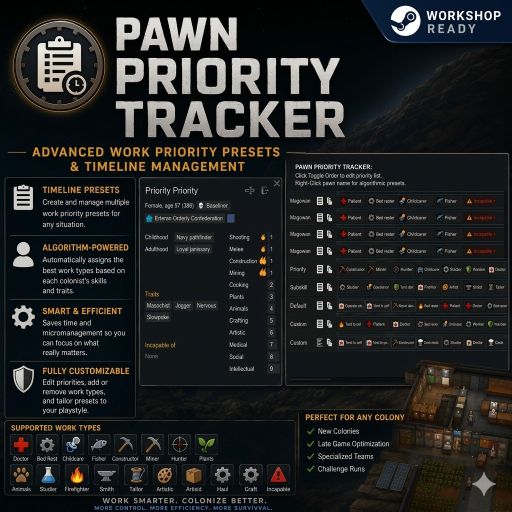
⚙️ Pawn Priority Tracker (RimWorld 1.6 Overhaul)
Tired of the classic RimWorld priority list and the static left-to-right 1–4 matrix? Pawn Priority Tracker completely disables the vanilla priority work table. No more trying to remember the complex left-to-right column order first and then managing a grid of 1–4 numbers—or even the modded 1–x scales. Now you can visually sort your work list exactly how you want. For players wanting micro-control over a skill, you can manually promote and add specific sub-tasks (like Tend Patient, Perform Surgery, or Feed Patient) directly onto the main bar and sort them exactly how you want them executed.🚀 Fluid Real-Time Drag & Slide Overhaul
Real-Time Sliding Priority Tracks: Simply click, hold, and slide any task card horizontally to drag-and-drop it anywhere along the row track! Adjacent cards smoothly step out of the way in real-time with satisfying tactile audio ticks as you rearrange your colonist's priority queue. Frozen Anchor Column Left Panel: Colonist name handles and text-free clipboard copy/paste buttons stay permanently locked to the left margin. You can scroll right to browse massive task tracks on widescreen monitors without losing track of which pawn you are editing! Foreground Background-Masking Plates: An advanced visual depth filter ensures sliding task cards glide cleanly behind your fixed colonist panels as you scroll horizontally, preventing text bleeding or layout overlap. High-Visibility Ghosted Passion Flames: Scales passion indicators up to a large 20x20px blueprint footprint ghosted directly underneath work text. Configured with a boosted high-contrast opacity filter (0.68f) to guarantee flawless readability on 4K setups without blocking typography. Cushioned Sub-Task Accordion Drawers: Remapped for absolute tactile intuition—left-click a card's square skill icon to drop open its sub-task selection tray. Use the (⇪) promoter button to tear out items onto the main bar, or right-click any promoted card on the timeline to instantly re-dock it back into its folder. Hysteresis Drifting Protection: An invisible 25-pixel mouse capture buffer field prevents accordion drawers from snapping shut accidentally when steering your mouse down toward tiny scrollbar tracks. Skill Competence Shaders: Task card borders are painted dynamically using a high-contrast 5-tier shading matrix—instantly highlighting pawn mastery levels from faded gray up to emerald green and glowing gold.📂 Save-Game Safe Uninstallation Guide
This mod utilizes a backend component database layer to cache custom timelines inside your active saves. To remove this mod from a running playthrough without causing corrupted XML data or red console error logs, follow these exact steps: 1. Re-Dock Active Tracks: Load your colony map file, open the Work Flow panel, and click the checkmark button (✓) on all promoted sub-tasks to move them back into their main folders. This resets pawns to a clean vanilla baseline. Save and exit to the main menu. 2. Disable the Mod: Open RimWorld's Mods Menu, uncheck Pawn Priority Tracker, and let the game restart. 3. Perform the Data Flush Save: Load back into your active colony save. The game will show a safe, one-time warning stating a mod was removed. This is completely normal and expected. Immediately open the pause menu and Save Game over your current slot or write to a fresh backup slot. 4. Finished!: This completely purges all custom layout data notes out of your .rws save file data tracks. Your save game is now 100% vanilla-clean and safe to play for the long haul!🛠️ Mod Compatibility
* RimWorld Target Version: 1.6.* Native API. * Modded Task Support: Runs a case-insensitive asset autoloader targeting your local files, automatically generating placeholder gear cogs for custom third-party labor mods to prevent layout crashes. * Mid-Save Installation: 100% Safe to add mid-save to any ongoing playthrough map.Similar Mods

Vanilla Hair Expanded
1.2.0 (17/05/2020): Fixed label length issue. 1.1.1 (29/02/2020): Beards now work perfectly fine! Thanks for your patience. We have all been there, with a colony of a hundred pawns where everyone looks somewhat the same. Starting colonists with no character to their looks. This m

Vanilla Textures Expanded
1.6.0 (16/07/2020): Updated to 1.3. Honestly, we added so many textures (including almost a full retexture of Royalty) I'm not going to bother. 1.5.0 (11/10/2020): Added faction icons in HQ. 1.4.0 (04/09/2020): Added various new textures: Snowmen, Flatscreen TV, Unfinished appare

Humanoid Alien Races
A framework for the creation of new alien races in Rimworld If you ever thought that the racial diversity in rimworld is.
More Mods by Valyn
Mycohazard - Reduced Soil Spread Patch
Take Control of Your Fungal Hive This is a standalone, lightweight configuration utility and Harmony patch designed specifically for Mycohazard - A Biological Mechanitor Mod.
Mechanitor: Synthetic Dawn - Swarms of War
Mechanitor: Synthetic Dawn - Swarms of War An ancient machine intelligence has awakened, driven to convert all organic life into metal perfection and faultless logic.
More Management Mods


Vanilla Expanded Framework
The Vanilla Expanded Framework (VEF) is a core modding library required by many of the Vanilla Expanded mods.

Vanilla Cooking Expanded
Mechanics are simple and intuitive - keeping within the vanilla spirit without unnecessary fluff and production chains.