RimRimModelEditor (Early Alpha dev edition)
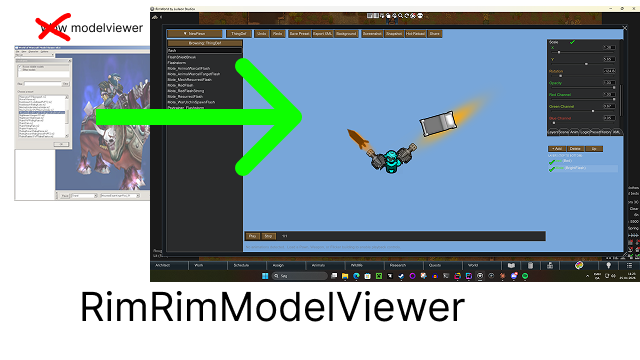
This is the beginning of a powerful in-game model/texture editor for modding.
This is the beginning of a powerful in-game model/texture editor for modding.
I often found myself wondering how an item would look if placed slightly different, or what motes or flecks look like with different settings. This mod gives you a full in-game editor — basically an IDE for RimWorld graphics and textures. You can literally edit any texture while in the game, see the changes live, and export the settings as XML. Along with a whole lot of other things. Some work, some don’t. That’s why I call it ALPHA. Any and all feedback is more than welcome. I hope this becomes a tribute to the amazing workshop community and the RimWorld community as a whole. We’ve had so much fun over the years.Current Features
Studio & Scene Management
- Multi-scene support — open multiple studio projects simultaneously as named tabs
- Rename scenes with custom names (falls back to first def name or "Empty Scene")
- Close individual scenes; always keeps at least one open
- Undo / Redo with configurable stack depth (tied to settings slider)
- Named version history (History tab) with restore points
- Deep-clone scene state for safe undo snapshots
Def Browser (Left Panel)
- Browse ThingDefs, FleckDefs, EffecterDefs, PawnKindDefs
- Search/filter by defName
- ThingDefs with an active layer → assign texture to that layer directly
- FleckDefs, EffecterDefs, PawnKindDefs → always open as their own scene object in a new tab
- Animated fleck path resolution (tries _0, _1, _a frame suffixes)
Preview Panel
- Real-time composited layer rendering
- Zoom (scroll wheel) and pan (middle mouse drag)
- Directional preview — rotate between South / East / West / North
- West direction auto-mirrors the East texture when no explicit _west variant exists
- Animation frame scrubbing (horizontal UV strip support)
- Checkerboard transparency background
- Custom background — solid colour presets or load from RimWorld content path or external file
- Background opacity slider
- Collision overlay
- Placement overlay
Layer System
- Add, delete, move up/down layers
- Per-layer: position (X/Y), scale (X/Y with linked-axis toggle), rotation, opacity, colour tint (RGB sliders)
- Layer visibility toggle
- Load custom texture from disk (PNG/JPG)
- Directional texture resolution (_south, _east, _north, _west)
- Body-type variant chaining for apparel (Duster_Male_south, Duster_Fat_south, etc.)
- Draw order by priority (Body → Apparel → Head → Beard → Hair → HeadAttachment → Hat → Weapon)
Pawn Compositing
- Automatic body + head + hair + apparel + weapon layer stack from PawnKindDef
- Runtime texture path discovery via PawnTextureScanner (handles RimWorld 1.4 / 1.5 / 1.6 path differences)
- 1.6 head subfolder support (Heads/Male/, Heads/Female/, HeavyJaw skull type, gender-neutral heads)
- Skin tone picker (Light / Medium / Brown / Dark)
- Body type picker (Thin / Fat / Hulk / Male / Female)
- Head type picker (all discovered paths + manual entry fallback)
- Hair colour tint picker
- Apparel body-type variant picker
- Quick-add Beard layer (auto-positioned at head, priority 3)
- Quick-add Head Attachment layer (eye patch, horns, scars — priority 5)
Inspector Panel
- Per-object: Draw Size, Draw Offset, Root Rotation
- Per-layer: Position, Scale (with linked axes), Rotation, Opacity, RGB colour channels
- Double-click any label to reset to neutral value
- Numeric input field next to every slider for exact values
- ThingDef-specific: Muzzle Flash Scale, Equipped Angle Offset
- FleckDef-specific: Growth Rate
XML Export
- ThingDef XML generation (graphicData, graphicClass, drawSize, drawOffset, colour tint, weapon angle)
- FleckDef XML (fade in/solid/fade out timing, growth rate)
- EffecterDef XML
- PawnKindDef XML (body + head graphicData in lifeStages)
- All-layers export — every layer as its own ThingDef block with full position/scale/colour annotations, sorted by priority
- Live XML preview tab
- Batch export
Screenshot & Portrait Export
- Full-window screenshot → Desktop/RimRimScreenshots/ (timing-correct, no white box)
- Preview panel snapshot — captures only the preview area
- Export dialog with three modes:
- Entire Scene — snapshot for wall-mounted portrait painting mod
- Current Layer — active layer texture for portrait painting mod
- Scene as XML — all layers as annotated ThingDef XML file
Toolbar
- Category selector (switches active def type)
- Undo / Redo buttons
- Save Preset
- Export XML
- Background picker (colour presets + RimWorld path + file + opacity + clear)
- Screenshot
- Snapshot (opens export dialog)
- Hot-Reload (force-reloads selected def textures without restarting)
- Share
Stability & Bug Fixes
- Null-safe layer names throughout (def.label ?? def.defName ?? "Base")
- BeginScrollView/EndScrollView always balanced (null guards prevent mid-draw exceptions)
- ThingDef.graphic never accessed at runtime (uses graphicData.texPath only)
- FleckDef/EffecterDef always routed to own scene, never smashed onto pawn layers
- Animated fleck textures handled gracefully (no crash on folder paths or null graphicData)
Tooltips
- Every toolbar button (with keyboard shortcuts where applicable)
- Every layer panel button and pawn picker row
- Every layer row (shows full texture path, priority, opacity, position, scale on hover)
- Every inspector slider (shows range, current value, double-click hint)
- Vector2 link button
- Load Custom Texture button
Keyboard Shortcuts
- Ctrl+Z / Ctrl+Y — Undo / Redo
- Ctrl+S — Save Preset
- Ctrl+E — Export XML
- Ctrl+F12 — Screenshot
- Ctrl+R — Hot-Reload
- Ctrl+L — Add Layer
- Ctrl+Delete — Delete Layer
- Zoom In / Out / Reset View
- Toggle Collision / Placement overlays
- Next / Previous animation frame
To-do .. and incoming suggestions :)
- Add culling in def lists Or maybe a finer sorting filter - one that works better than the existing.
############# Exporting #############
When you use snapshot export, the best idea is to export it directly to your mod folder. It will recognize previous snapshots and automatically create new numbered versions so you can build up your own repository of custom snapshots you can mount on walls in-game. If you exported to your mod folder: After export: Activate the mod: Portrait_MyColonist Finally: Enjoy and have fun. Post Scriptum Thank you for the feedback and support! Any and all is welcome. Tag me on Discord or on the workshop. Github link: https://github.com/d4egon/RimRimModelEditorSimilar Mods

Vanilla Weapons Expanded
We are not responsible for CE patch, nor are we responsible for CE balancing or in fact anything regarding CE.
Vanilla Fishing Expanded
Vanilla Fishing Expanded is a first module in a brand new mod series “Vanilla Cuisine Expanded” from the Vanilla Expanded team.

Vanilla Furniture Expanded - Art
1.2 (29/08/2020): Fixed laggy hologram code. This mod now requires our framework. 1.1.1 (14/08/2020): Fixed the issue with pottery display radius for meditation, Added decorative plant pots. This module is a part of Vanilla Furniture Expanded which can be downloaded below. Vanill
More Mods by D4egon
![[DISCONTINUED] BurkaMongus](https://images.steamusercontent.com/ugc/1704036178799888643/84EABFD3EEB3E41FED64B5F958C5032BE96C95CB/)
[DISCONTINUED] BurkaMongus
Since my life is undergoing some big changes I have no time to update or create any mods at the current moment.

RimVoice Framework
This mod is a framework - that enables you to give voice to your colonists, RPG style!
![[DISCONTINUED] Quiche](https://images.steamusercontent.com/ugc/1700657545356353587/B117068E3DC14470CEBDE276038B42DDD384598F/)
[DISCONTINUED] Quiche
Since my life is undergoing some big changes I have no time to update or create any mods at the current moment.

Pawn Chronicles: Personal Epics
For Players Who Want Their Colonists to Feel Like Protagonists Your colonists already have backstories.
More Management Mods
Vanilla Textures Expanded
1.6.0 (16/07/2020): Updated to 1.3. Honestly, we added so many textures (including almost a full retexture of Royalty) I'm not going to bother. 1.5.0 (11/10/2020): Added faction icons in HQ. 1.4.0 (04/09/2020): Added various new textures: Snowmen, Flatscreen TV, Unfinished appare

Wall Light
As of update 1.5, Rimworld now contains wall lamps that serve the same purpose that this mod served for many, many years. So, what does this do now? Adds wall sun lamps. Lets you configure the vanilla wall lamps (and the added wall sun lamps) like you could with the old wall ligh

Vanilla Events Expanded
See changenotes. Vanilla Events Expanded is one of our oldest mods, and I’m honestly shocked it’s holding up so well - it’s pretty resistant to game updates and bugs because of its simplicity. Back when I first made it with Kikohi, we didn’t know much about modding. I just wanted

EdB Prepare Carefully
Customize your RimWorld colonists, choose your gear and prepare carefully for your crash landing!