SubCell Placement
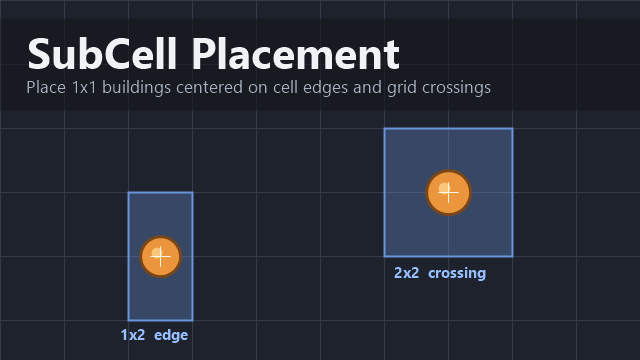
Place 1x1 buildings centered on a cell edge (1x2 area) or on a grid crossing (2x2 area), instead of being forced onto a single whole cell.
Place 1x1 buildings centered on a cell edge (1x2 area) or on a grid crossing (2x2 area), instead of being forced onto a single whole cell.
HOW TO USE
1. Open Options - Mod Settings - SubCell Placement.
2. Enable the buildings you want (or switch to "All eligible" mode).
3. Restart RimWorld (variants are generated at startup).
4. In the Architect menu, each enabled building gains two extra entries:
- "(1x2 centered)" - sits centered on the edge between two cells. Rotate while placing to choose the orientation.
- "(2x2 centered)" - sits centered on the point where four cells meet.
The original building is untouched; normal placement still works.
HOW IT WORKS
The mod auto-generates footprint-wrapper variants: real 1x2 / 2x2 buildings that draw the original 1x1 graphic at its native size. RimWorld already centers even-sized buildings on edges and crossings, so rendering is exact and engine-native. The variant reserves its full 1x2 / 2x2 area.
NOTES
- Centered variants are not minifiable (v1 limitation); deconstruct to move them.
- Once you have placed a centered variant, its defs keep being generated even if you later un-tick the building, so saves stay loadable.
- An optional advanced "true offset" mode (off by default) draws a real 1x1 shifted by half a cell without reserving neighbors. Neighbor cells stay usable, so overlaps are possible - read the setting tooltip before enabling.
- Safe to add to existing saves. Removing the mod removes any placed variants (standard missing-def behavior).
Requires Harmony. No DLC required.
Similar Mods

Vanilla Cooking Expanded
Mechanics are simple and intuitive - keeping within the vanilla spirit without unnecessary fluff and production chains.

Vanilla Events Expanded
See changenotes. Vanilla Events Expanded is one of our oldest mods, and I’m honestly shocked it’s holding up so well - it’s pretty resistant to game updates and bugs because of its simplicity. Back when I first made it with Kikohi, we didn’t know much about modding. I just wanted

RimHUD
RimHUD is a UI mod that displays detailed information about a selected character or creature.
More Mods by Thom Kirke
More Management Mods
Vanilla Events Expanded
See changenotes. Vanilla Events Expanded is one of our oldest mods, and I’m honestly shocked it’s holding up so well - it’s pretty resistant to game updates and bugs because of its simplicity. Back when I first made it with Kikohi, we didn’t know much about modding. I just wanted

QualityBuilder
With QualityBuilder all buildings that have quality (beds, tables etc) will only be build by the best builder to ensure the best outgoing quality.

Dubs Mint Menus
Adds new list boxes for recipe bills, health bills, plant selection, architect menu, research menu, and a quick select menu for designators, making it easier to find things when lots of mods are running.

Vanilla Textures Expanded
1.6.0 (16/07/2020): Updated to 1.3. Honestly, we added so many textures (including almost a full retexture of Royalty) I'm not going to bother. 1.5.0 (11/10/2020): Added faction icons in HQ. 1.4.0 (04/09/2020): Added various new textures: Snowmen, Flatscreen TV, Unfinished appare